

Running a multi-project lab is like managing five different restaurants out of one kitchen. Each project has its own protocols, timelines, and requirements, but they're all fighting for the same instruments, freezers, and bench space. Working with research facilities across the board, I've watched this same pattern wreck productivity over and over: labs start optimistic about resource sharing, then slowly descend into chaos as samples get misplaced, data gets mixed up, and project deadlines collide.
The core problem isn't the people or even the equipment. It's that most labs never design a proper sample lifecycle strategy for multi-project environments. They just hope their LIMS and some Excel sheets will somehow keep everything straight — which is a bit like expecting a filing cabinet to run air traffic control.
What actually works is building state-machine maps that track every sample through defined lifecycle stages, creating handoff templates that prevent information loss between teams, and establishing metadata standards that hold up across different project types. Labs that implement proper lifecycle architecture routinely go from losing 15–20 samples per month to near-perfect tracking. It's not magic, it's just structure.
State Machines: Your Sample's GPS Through the Lab
Most labs think of samples as having maybe three states: received, processing, complete. That's nowhere near granular enough for multi-project operations. A genomics core I worked with discovered they actually had 23 distinct sample states across their various workflows. Miss even one state and samples disappear into operational black holes.
Here's what a realistic state machine looks like for a proteomics workflow handling both clinical and research samples:
Initial States:
-
Pre-registered (sample expected but not received)
-
Received-unverified (physically present, not QC'd)
-
QC-pending (awaiting quality check)
-
QC-failed-hold (failed initial check, awaiting decision)
-
QC-passed-queue (ready for processing)
Processing States:
-
Prep-scheduled (assigned to prep batch)
-
Prep-active (currently in preparation)
-
Prep-paused (workflow interrupted)
-
Analysis-queue (prepped, awaiting instrument)
-
Analysis-active (on instrument)
-
Analysis-error (run failed, needs review)
Terminal States:
-
Results-pending-review
-
Results-approved
-
Archived-retrievable
-
Disposed-documented
Each transition between states needs defined triggers and permissions. Can a technician move a sample from QC-failed to QC-passed? Who approves disposal? What happens if a sample needs to go backward in the workflow? These aren't edge cases — they happen constantly in busy labs, and without rules around them, you get chaos.
The real power comes from mapping these states to actual operational constraints. Samples in "Analysis-queue" automatically factor into instrument scheduling. Samples stuck in "QC-failed-hold" for more than 72 hours trigger escalation emails. This turns your state machine from a tracking tool into something that actively runs the operation.
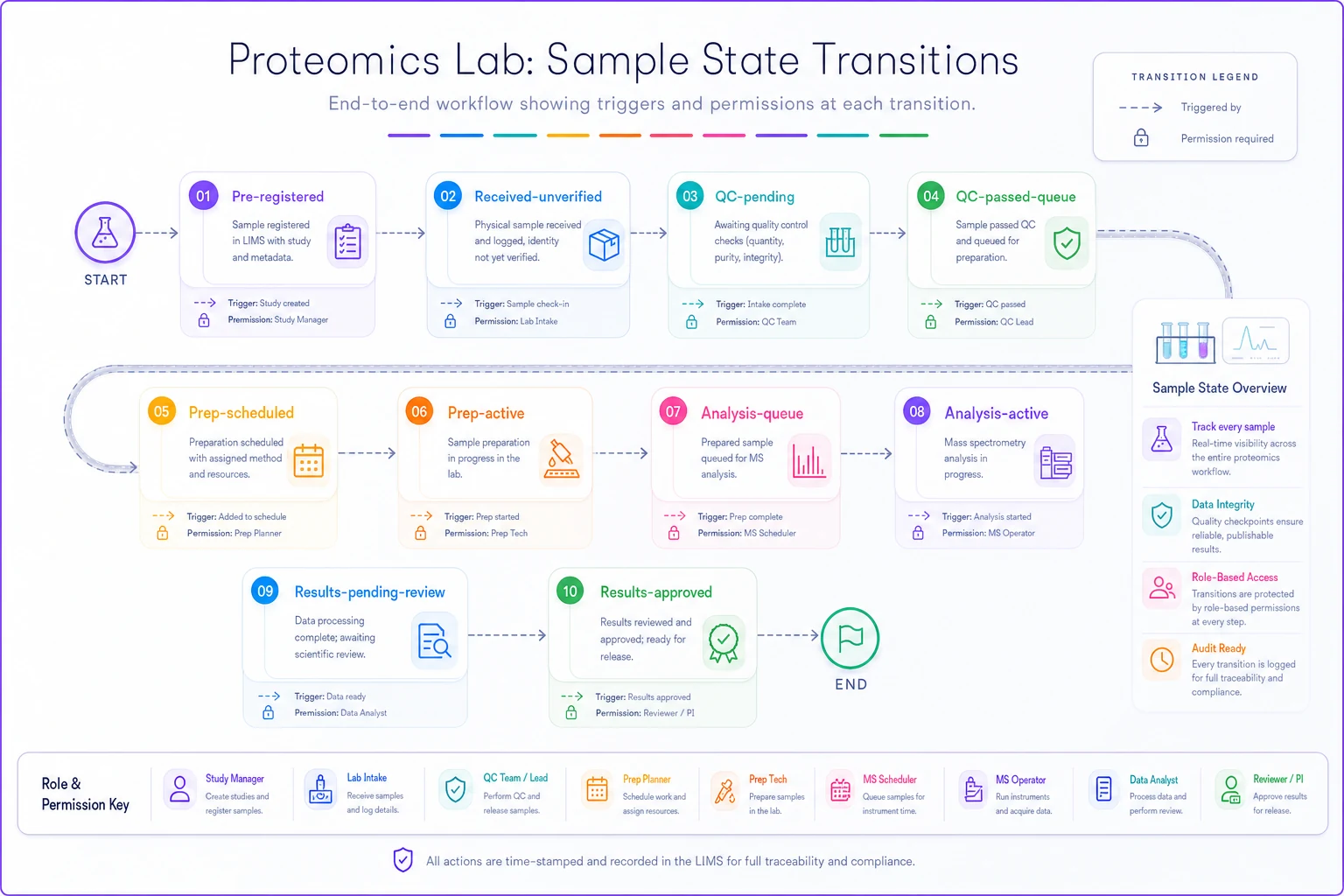
This diagram highlights transitions, triggers and who can authorize each state change.
Handoff Templates That Actually Prevent Information Loss
Watch what happens when Sample A moves from the extraction team to the sequencing team in most labs. The extraction tech writes some notes in their notebook, maybe updates a spreadsheet, then physically moves the sample to another freezer. The sequencing tech finds it three days later with almost no context about what happened during extraction. Critical information vanishes at every handoff.
Eliminate lab bottlenecks and errors.
Labioly helps you monitor, manage, and report lab activities efficiently and compliantly.
- Real-time sample tracking
- Inventory and supply alerts
- Staff workflow coordination
No credit card required
Multi-project labs need structured handoff templates that capture everything the next team actually needs. Not generic forms — specific templates for each type of transition.
A DNA extraction to library prep handoff should include:
-
Extraction method and kit lot
-
Input tissue amount
-
Yield and concentration
-
260/280 and 260/230 ratios
-
Storage conditions since extraction
-
Any protocol deviations
-
Remaining volume
-
Project-specific requirements met (yes/no)
The operational detail that makes a real difference: these templates need to be bi-directional. The receiving team has to acknowledge receipt and verify the information matches the physical sample. One lab reduced handoff errors by around 85% just by requiring digital acknowledgment within 4 hours of physical transfer.
Require digital acknowledgment within 4 hours of physical transfer to cut handoff errors.
Templates also need versioning. When Project A updates their requirements, you can't break handoffs for Projects B through E. Maintain template versions tied to project IDs, with clear sunset dates for deprecated versions.
Metadata Standards: The Universal Language Your Projects Need
Every research project thinks their metadata requirements are unique. The cancer study needs tumor grade and stage. The microbiome project needs collection site and preservation method. The drug discovery team needs compound exposure history. Before long, you're managing 40-something different Excel templates that nobody fills out consistently.
Forcing everyone into the same rigid structure kills research flexibility — but leaving everything wide open is just as bad. The solution is a three-tier metadata architecture:
Core Metadata (Required for all samples):
-
Unique identifier
-
Project ID
-
Sample type
-
Collection date/time
-
Current location
-
Current state
-
Chain of custody log
Domain Metadata (Required based on sample type):
-
For human samples
consent ID, de-identification status
-
For cell cultures
passage number, culture conditions
-
For environmental samples
GPS coordinates, collection method
Project Metadata (Flexible per study):
-
Custom fields defined in project setup
-
Validation rules specific to project
-
Export formats for project-specific analysis tools
The key is making this metadata queryable across projects without exposing sensitive information. A well-designed system lets the facility manager ask "How many RNA samples in freezer B are older than 6 months?" while preventing Project A from seeing Project B's sample details.
Integration Touchpoints Without Creating Chaos
Multi-project labs typically run somewhere between 8 and 15 different software systems. LIMS for sample tracking, ELN for protocols, instrument software for each platform, project management tools, billing systems, various analysis pipelines. Each project wants their own additional tools on top of that.
The mistake labs make is trying to integrate everything with everything. You end up with a tangled mess of connections that breaks whenever any system updates. Instead, design integration touchpoints around state transitions and handoffs.
Critical integration points:
-
Sample registration (external system → LIMS)
-
Instrument queue (LIMS → instrument software)
-
Result capture (instrument → LIMS/storage)
-
Billing triggers (LIMS → financial system)
-
Project updates (LIMS → project management)
Each touchpoint should have:
-
Defined data format (JSON schema, CSV template)
-
Validation rules
-
Error handling procedures
-
Retry logic for failures
-
Manual override process
For a mass spec core, this might mean samples in "Analysis-queue" automatically appear in the instrument worklist software every morning at 7 AM. Results automatically upload back to LIMS upon run completion, triggering state change to "Results-pending-review." Failed uploads queue for manual intervention rather than blocking the instrument.
Real-World Implementation: Academic Core Facility
An academic proteomics core supporting 12 research groups went through this redesign after years of tracking samples across Excel, Google Sheets, and paper notebooks. Projects were constantly complaining about delayed results and lost samples.
The implementation started with mapping their actual workflows, not their theoretical ones. Turns out they had four different sample prep protocols running simultaneously, each with different state progressions. They built state machines for each, with clear convergence points where workflows merged.
Handoff templates were contentious at first. The extraction team felt like they were being handed extra documentation work. That changed once the LC-MS team could suddenly troubleshoot failed runs by seeing exactly what happened during sample prep. Error investigation time dropped from hours to minutes.
Metadata standardization took around three months of negotiation. Every PI wanted their own fields. The eventual compromise: 12 core fields mandatory for all samples, 8 optional fields based on sample type, unlimited project-specific fields with a 30-field display cap in the main interface.
Results after six months:
| Metric | Before | After |
|---|---|---|
| Sample loss per month | 16–18 | 2–3 |
| Time to locate a specific sample | 15–45 min | Under 2 min |
| Cross-project contamination events | 3 (Q1) | 0 (following 2 quarters) |
| Billing disputes per month | 8–12 | 1–2 |
The unexpected benefit: graduate students could find and verify their own samples without involving core staff. Support requests dropped by roughly 60%.
Building Your Sample Lifecycle Strategy
Start by mapping your current state, not your ideal state. Track 100 samples through your lab and document every step, every pause, every decision point. You'll find states and handoffs you didn't know existed.
For state machines, begin with a simple linear flow, then add branches for common exceptions. A qPCR core might start with: Received → QC → Amplification → Analysis → Complete. Then layer in branches for QC failure, amplification failure, and re-runs.
Design handoff templates by talking to both sides of each transfer. What does the sending team think they're communicating? What does the receiving team actually need? The gap between those two answers shows you exactly what's being lost.
Metadata standards take political capital. Start with absolutely mandatory fields that enable basic operations. Add domain-specific fields only when multiple projects need them. Let projects define custom fields but limit how many appear in standard views — otherwise nobody uses the interface.
Integration should be incremental. Pick the most painful disconnect in your current operations and solve that first. Prove the value, then expand.
Warning Signs Your Current System Won't Scale
If you're experiencing any of these, your sample lifecycle strategy needs serious work.
The "Where's My Sample" Dance
-
Staff spend more than 30 minutes a day hunting for samples. You maintain a "sample location spreadsheet" that's always out of date. Projects email asking about sample status because they can't check themselves.
The Metadata Mess
-
Different projects store the same information in different formats. You can't query across projects without manual data cleaning. New projects mean entirely new tracking spreadsheets.
The Integration Breakdown
-
Data is manually transferred between systems more than twice. Instrument runs happen without LIMS knowing about them. Billing is based on paper records or manual counts.
The Handoff Black Hole
-
Samples mysteriously disappear between teams. Quality issues get traced back to "sometime during processing." Nobody can agree on whose responsibility a sample is at any given point.
These problems compound as you add projects. A lab running 3 projects might cope with spreadsheets and email. At 10 projects, you're drowning. At 20, you're turning away business because the operational complexity has outgrown your systems.
The AI-Powered Coordination Layer
Modern operational platforms can handle a significant chunk of this lifecycle management automatically. AI-assisted systems monitor state transitions, flag anomalies, and predict bottlenecks before they cause real damage.
Automatic sample routing is one example that has clear impact: a well-configured platform can look at current instrument queues, technician schedules, and project deadlines to optimize sample flow. Instead of samples sitting in "Analysis-queue" for days waiting on someone to notice, the platform actively schedules them for the next available slot that fits their requirements.
Handoff automation removes a lot of documentation friction. The system pulls relevant metadata from previous states, pre-populates handoff forms, and routes them to the right recipient based on sample type and project. It functions like a coordinator who never forgets a handoff detail.
For metadata specifically, AI-powered operational software can suggest field mappings between projects, identify when a custom field has become common enough to standardize, and validate entries against historical patterns. When someone enters a DNA concentration of 5000 ng/μL, the system flags it as a likely error based on typical ranges for that sample type.
These platforms also help with integration by acting as a middle layer between systems. Instead of point-to-point connections that break every time a vendor pushes an update, everything routes through the operational platform. When your mass spec software changes its export format, you update one adapter instead of a dozen integrations.
Who Should Implement This vs Who Should Wait
This architecture makes sense if you're running more than 3–4 concurrent projects or processing more than 200 samples per week. Below that threshold, the overhead might not justify the structure.
Academic cores supporting multiple PIs need this. Contract research organizations juggling client projects need this. Clinical labs running both diagnostic and research samples need this.
Small research groups with stable workflows probably don't. Teaching labs with predictable semester patterns probably don't. Single-project focused labs can use simpler systems without much penalty.
The investment typically runs $40–80k for initial implementation, covering software, training, and process redesign. Ongoing costs run around $2–4k monthly for software and maintenance. ROI usually turns positive within 8–10 months for labs processing over 500 samples monthly.
Implementation Roadmap
Month 1–2: Workflow Mapping
-
Document current state for all major sample types
-
Identify all handoff points
-
Catalog existing metadata across projects
-
Map integration touchpoints
Month 3–4: Architecture Design
-
Build state machines for each workflow
-
Create handoff templates
-
Design metadata hierarchy
-
Specify integration requirements
Month 5–6: Pilot Implementation
-
Choose 1–2 projects for pilot
-
Implement basic state tracking
-
Test handoff templates
-
Validate metadata structure
Month 7–8: Gradual Rollout
-
Add projects incrementally
-
Refine based on feedback
-
Build integrations one at a time
-
Train all staff
Month 9+: Optimization
-
Add automation where beneficial
-
Implement predictive scheduling
-
Build custom reports
-
Expand integration footprint
Don't try to build everything at once. Even basic state tracking and handoff templates will noticeably change day-to-day operations. Add sophistication as you prove value and gain buy-in from the people who have to use it every day.
Bottom Line
Multi-project labs fail when they treat sample lifecycle management as an afterthought. Samples move through dozens of states, cross multiple team boundaries, and carry increasingly complex metadata. Excel and email can't handle that at scale — and the labs that keep trying find out the hard way.
Building proper state machines, handoff templates, and metadata standards isn't just about compliance or tidiness. It's about turning your lab from a chaotic collection of competing projects into something that actually runs like a coordinated operation. When samples flow through defined states with clear handoffs and searchable metadata, everything downstream improves: turnaround time, quality, client satisfaction, and the general sanity of your staff.
The technology exists to automate much of this coordination. AI-powered platforms can track states, manage handoffs, validate metadata, and handle integrations without constant human intervention. But even without sophisticated software, simply documenting your states and standardizing your handoffs will move things in the right direction.
Start with mapping your actual sample lifecycle — not the one in your SOPs, but what really happens on a Tuesday afternoon when three projects need the same instrument. Build from that reality, and you'll end up with a sample lifecycle strategy that holds up when your multi-project lab is running at full capacity.
Start with mapping your actual sample lifecycle — not the one in your SOPs, but what really happens on a Tuesday afternoon when three projects need the same instrument. Build from that reality, and you'll end up with a sample lifecycle strategy that holds up when your multi-project lab is running at full capacity.
Ready to upgrade your lab operations?
Join 500+ labs using Labioly to save time, reduce errors, and enhance productivity and compliance.