

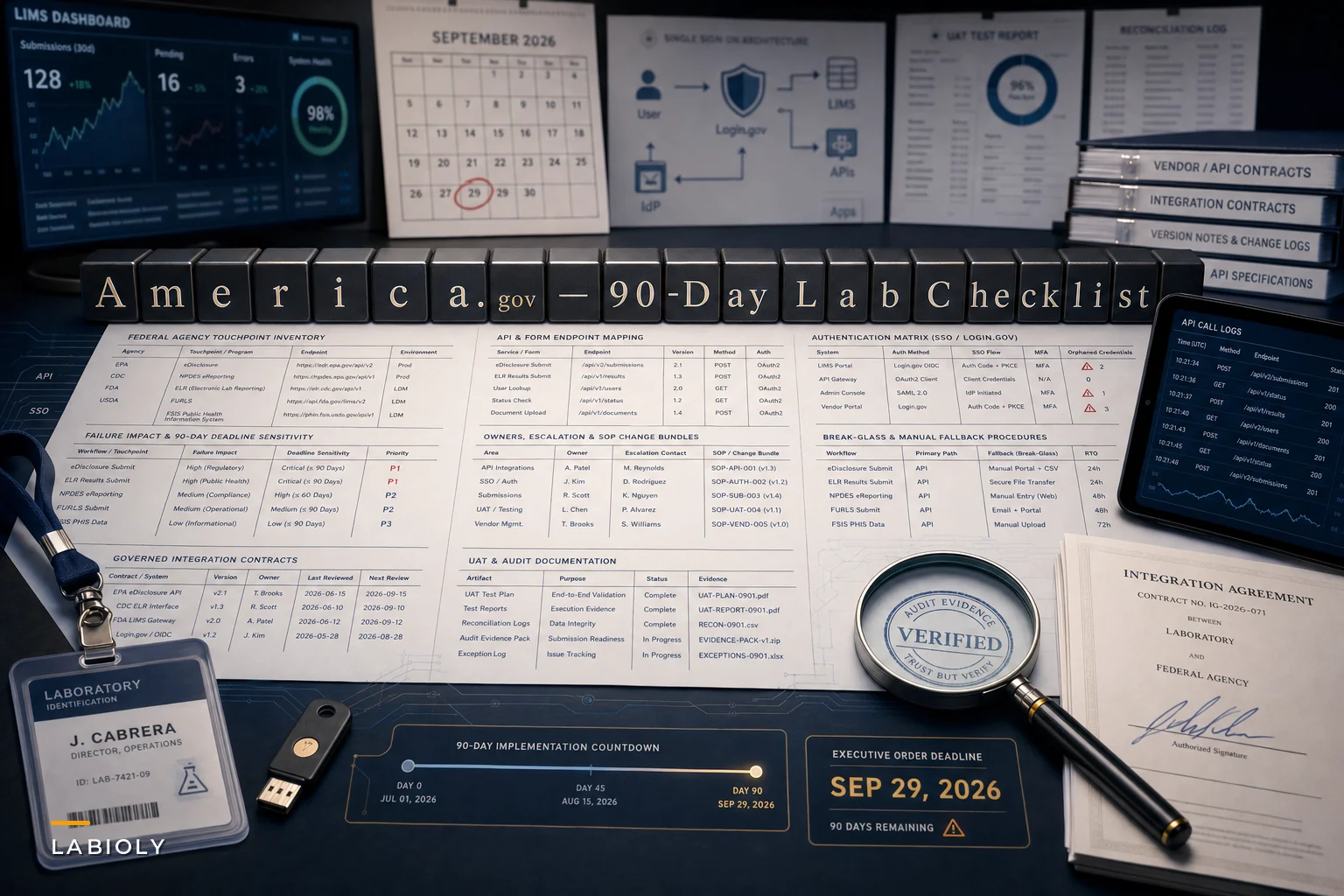

The signature on the executive order matters less to your lab than the 90-day clock attached to it. On September 29, 2026, the White House issued an order establishing America.gov as a unified front door for federal services, directing agencies to expose public APIs, standardize digital forms, and route authentication through Login.gov. OMB and GSA are running implementation on an accelerated memo cycle.
If your lab submits grants to NSF, files adverse-event or regulatory data to FDA, pulls from CDC or NIH dashboards, or reports anything through HHS portals, the endpoints and login flows you depend on are going to shift — and not on a timeline you control. Federal News Network's reporting on how the administration built toward the launch makes clear this isn't a vague aspiration; the groundwork has been in place for months.
This isn't about politics. It's about the practical fact that a submission endpoint changing silently can break a grant deadline, and nobody notices until the portal returns a 404 at 11:40 PM the night before a cycle closes. What follows is a prioritized, 90-day operational plan to keep that from happening.
Why This Hits Labs Harder Than Most Organizations
Most organizations touch federal services occasionally — a form here, a filing there. Labs are different. A mid-sized research lab can hit federal endpoints dozens of times a week: grant progress reports, biosafety documentation, controlled-substance filings, clinical registry updates, equipment grant disbursements, export-control attestations.
Each of those touchpoints usually has its own authentication path, its own submission format, and its own audit trail that your LIMS or ELN may or may not capture cleanly. When the front door changes, all of those downstream dependencies wobble at once.
The deeper problem the order exposes isn't really technical. It's that most labs have never actually inventoried their federal-facing workflows. People know that grants get submitted. Few can tell you which service account authenticates the automated progress-report pull, or what happens to the confirmation receipt after submission. That invisible institutional knowledge is exactly what breaks during a forced migration.
First: Build Your Federal-Facing Workflow Inventory
You can't secure or re-test what you haven't mapped. Before touching a single authentication setting, spend the first week building a plain-language inventory of every workflow that crosses into a federal system.
Eliminate lab bottlenecks and errors.
Labioly helps you monitor, manage, and report lab activities efficiently and compliantly.
- Real-time sample tracking
- Inventory and supply alerts
- Staff workflow coordination
No credit card required
A workable inventory captures more than "we submit grants." For each workflow, you want:
-
The agency and specific service (e.g., NIH eRA Commons progress reports)
-
The current authentication method (personal login, institutional SSO, service account, API key)
-
Whether a human does it manually or it's automated/scheduled
-
The data format going out and coming back
-
Where the confirmation/receipt is stored, if anywhere
-
Who owns it, and who notices if it fails
One pattern worth noting: the workflows most at risk are almost never the ones people worry about. The quarterly grant submission has three people watching it. The automated nightly pull from a CDC surveillance feed that feeds your QC dashboard? One person set it up two years ago, documented nothing, and left. That's the one that silently dies.
Start your inventory with scheduled and automated jobs — they're the silent failures that cause the worst surprises.
That's the one that silently dies.
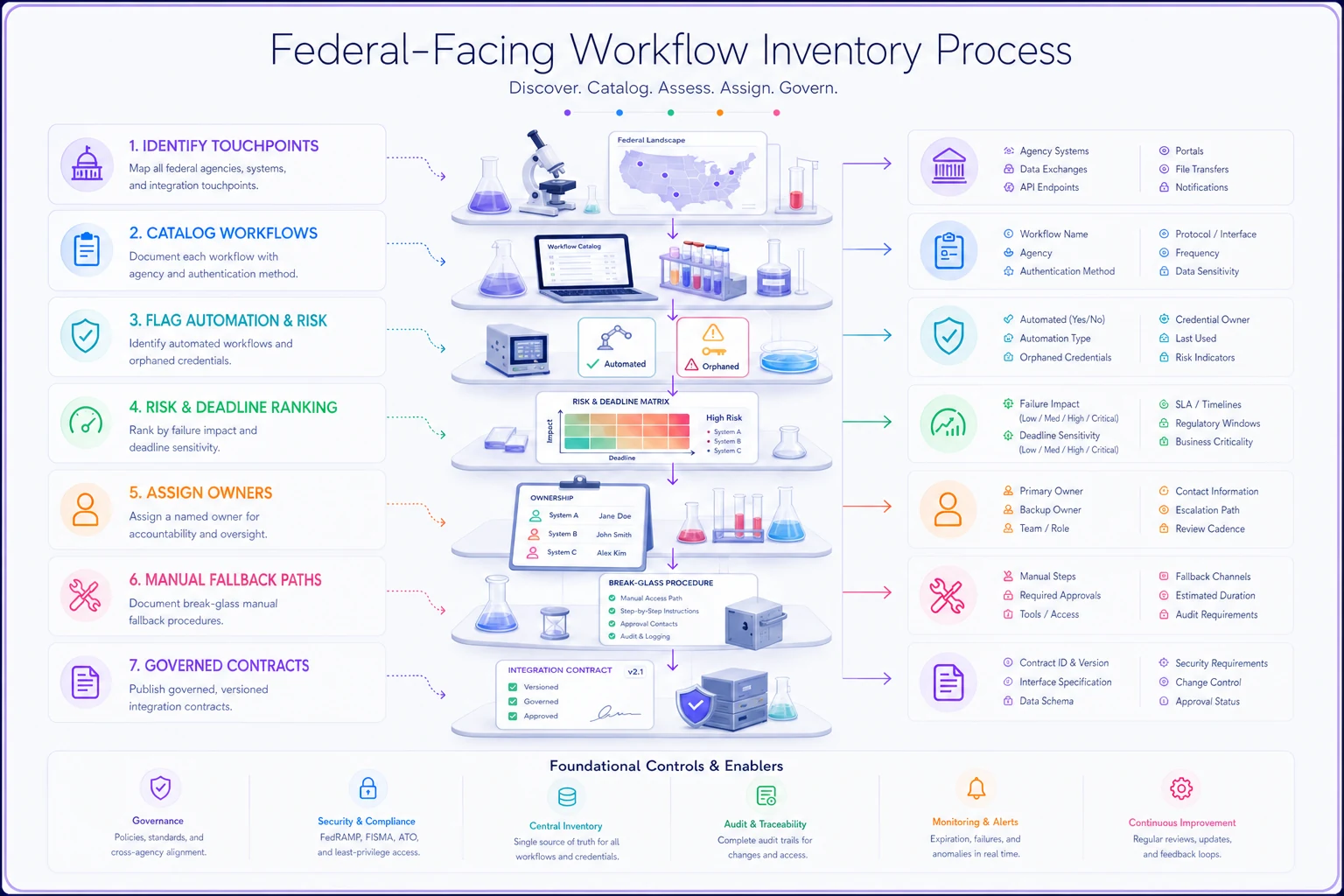
Use this workflow as a practical checklist while you catalog and assign owners.
Prioritizing What to Fix First
Not all federal-facing workflows deserve equal urgency. Trying to migrate everything at once is how teams burn 90 days and finish nothing. Rank by blast radius and deadline sensitivity.
| Workflow Type | Failure Impact | Migration Urgency | Typical Hidden Risk |
|---|---|---|---|
| Grant submission / progress reports | Missed deadline, lost funding | High | Confirmation receipts not archived |
| Regulatory/safety filings (FDA, etc.) | Compliance violation | High | Format changes rejected silently |
| Automated dashboard/data pulls | Broken analytics, bad decisions | Medium–High | Orphaned service accounts |
| Export-control / attestation forms | Legal exposure | Medium | Manual, undocumented steps |
| Reference/lookup API calls | Degraded convenience | Low | Rate-limit or endpoint drift |
The high-urgency rows are where your first 30 days should go. A broken reference lookup is annoying. A rejected safety filing during the implementation window is a finding.
The Authentication Shift Is the Real Landmine
The move toward Login.gov as the identity layer is where most of the breakage will happen. Labs tend to run a messy mix of personal accounts, shared institutional logins, and automated service accounts that were never meant to go through a human-centric identity provider.
In practice, this usually surfaces in an ugly way: an automated process that's been authenticating with a stored credential suddenly hits a flow that expects multi-factor confirmation from a human. The script doesn't know how to respond. The submission fails. And because it's automated, the failure email goes to a distribution list nobody reads.
-
Identify every automated process that authenticates to a federal endpoint. These are your highest-risk items because they can't improvise.
-
Confirm whether your institution's SSO will federate with Login.gov, or whether individuals will manage their own identities. This single decision cascades into dozens of workflow changes.
-
Establish a break-glass manual path for every automated submission, so a human can complete it if the automated flow fails mid-window.
-
Document who holds which credentials — the most skipped step, and the one that causes the most panic when someone's on vacation during a cutover.
The mistake worth flagging hardest: treating authentication as an IT-only problem. The person who understands why a submission exists is rarely the person who understands how it authenticates. Those two people need to be in the same room during planning, or you'll end up with a technically perfect migration of a workflow nobody actually uses, while the important one quietly rots.
Chain-of-Custody and Audit Evidence Need Updating Too
Every time an endpoint or authentication method changes, your audit evidence changes with it. If an auditor asks you to prove who submitted a filing, when, and that it was received, your old answer — a screenshot of the old portal's confirmation page — may no longer exist in the same form.
New API-based submission flows produce different evidence: API response codes, request IDs, timestamped logs from the America.gov layer. That's actually better evidence than a screenshot, if you capture and retain it. Most labs won't, because their LIMS was configured to store the old confirmation artifact and nothing told it to capture the new one.
Build this into your migration explicitly. For each high-priority workflow, define:
-
What constitutes proof-of-submission under the new flow
-
Where that proof gets stored in your LIMS or evidence archive
-
How long it's retained and under what retention class
-
How timestamp integrity is preserved so it survives an audit challenge
This is where disciplined integration governance pays off. The field contracts, versioning discipline, and staged-test mindset covered in our guide to API governance for ELN/LIMS integrations map almost directly onto this problem — a new agency API is just another integration contract you need to version, test, and monitor. Labs that already treat integrations this way will barely feel the America.gov transition. The ones held together with undocumented scripts will feel all of it.
A Real Scenario: The Translational Lab That Almost Missed a Cycle
A translational research lab running roughly 40–50 active studies, with a two-person research IT function and a LIMS owner who inherited the system mid-career. They submit progress reports and safety data across three agencies and had automated the two most frequent submissions years earlier.
When they finally sat down to inventory federal-facing workflows, they found eleven distinct touchpoints — they'd assumed there were about five. Two of the automated ones ran under a departed employee's personal credential. One nightly data pull had been failing silently for weeks because an interim endpoint change had already landed, and stale data had been feeding a dashboard the PIs used for enrollment decisions.
The fix wasn't dramatic. They re-pointed the automated jobs to proper service accounts, built break-glass manual procedures for the two highest-stakes submissions, and configured their LIMS to archive API response receipts instead of portal screenshots. Total effort landed somewhere in the range of three focused weeks spread across the quarter. Going into the implementation window, they knew exactly what would break and who'd fix it, instead of discovering it the night before a deadline.
The lesson wasn't "automation is risky." It was that undocumented automation is risky, and a forced migration is the moment the bill comes due.
When to Move Fast, and When Not To
Not every lab needs to sprint. A clear-eyed read on your situation saves wasted effort.
Move aggressively now if:
-
You have deadline-sensitive submissions landing in the next quarter
-
Your automated federal workflows run under personal or shared credentials
-
You can't produce a current inventory of federal-facing endpoints
You can pace yourself if:
-
Your federal interactions are infrequent and fully manual
-
Your institution's central IT already manages Login.gov federation for you
-
You have strong integration governance and clean service-account hygiene already
Small labs with only a handful of manual, low-stakes submissions should be cautious about over-engineering this. Spinning up elaborate monitoring for two grant reports a year is wasted motion. Do the inventory, confirm the login path, and move on.
The 90-Day Checklist
A compressed version you can actually work from:
-
[ ] Days 1–10 Complete federal-facing workflow inventory. Flag everything automated and everything with a near-term deadline.
-
[ ] Days 10–20 Rank workflows by failure impact and urgency. Identify all orphaned or shared credentials.
-
[ ] Days 15–30 Confirm Login.gov / SSO federation decision with central IT. Document identity ownership per workflow.
-
[ ] Days 20–45 Build break-glass manual procedures for high-urgency automated submissions.
-
[ ] Days 30–50 Define new proof-of-submission evidence for each priority workflow; configure LIMS to capture and retain it.
-
[ ] Days 40–65 Run staged tests against any published agency APIs or digital forms as they go live. Treat each as a versioned integration contract.
-
[ ] Days 55–75 Execute prioritized UATs on high-impact submissions end to end, including the new authentication flow.
-
[ ] Days 70–90 Finalize change-control records, update vendor/API agreements, and brief the people who own each workflow on what changed.
The date ranges overlap — this isn't a clean waterfall, and it shouldn't be. Inventory keeps surfacing new items while you're already testing the known ones. That's normal. Plan for it.
The Underlying Problem Worth Fixing Permanently
The America.gov transition is a deadline, but it's also a diagnostic. It reveals how much of your lab's federal connectivity lives in one person's head, in undocumented scripts, and in evidence artifacts that were never designed to survive a format change.
Labs that come through this cleanly will be the ones that stop treating federal submissions as one-off tasks and start treating them as governed integrations — with named owners, versioned contracts, captured evidence, and tested fallback paths. Do that work now, under a forced 90-day clock, and the next federal change — because there's always a next one — becomes a routine update instead of a fire drill.
The clock is already running. The best use of the next week isn't choosing software or debating architecture. It's finding out exactly how many federal doors your lab walks through, and which ones nobody's been watching.
Ready to upgrade your lab operations?
Join 500+ labs using Labioly to save time, reduce errors, and enhance productivity and compliance.