

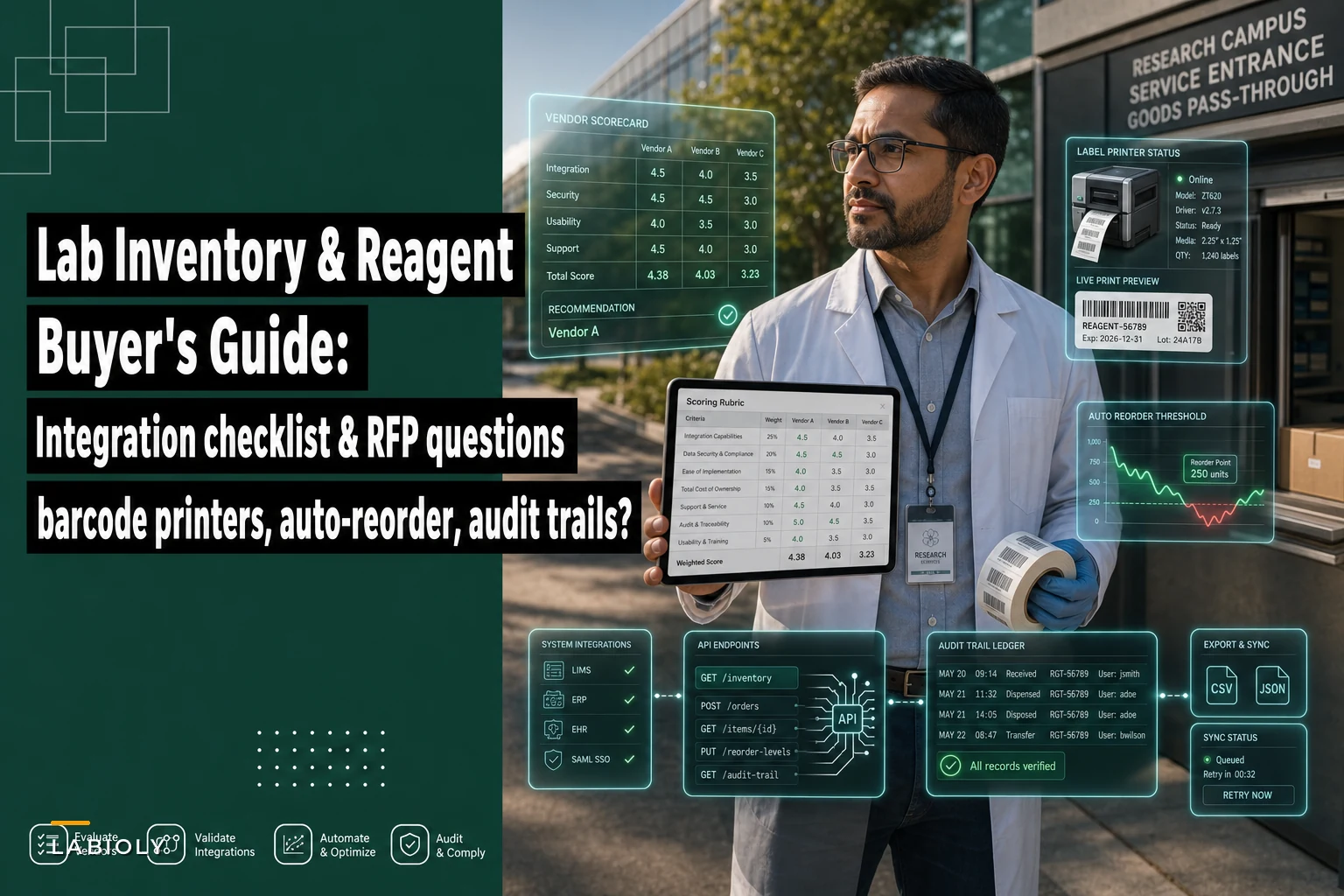

Most inventory system demos look great. The vendor logs in, scans a pre-printed barcode, a reorder alert fires right on cue, and the audit log fills in with a neat timestamp. Everyone nods. Then six months after go-live, someone figures out the auto-reorder never fired for a controlled reagent because the min/max logic doesn't account for open-but-unused stock, the barcode printer only works on the one Zebra model IT bought by accident, and the disposal log can't be exported in a format the quality team will accept during an audit.
The gap between demo and deployment is almost always in the integration layer and edge-case handling — the stuff vendors don't volunteer and buyers forget to ask. This guide is built to close that gap. It gives you a prioritized feature matrix, specific technical questions that separate real integrations from marketing claims, sample RFP sections, a scoring rubric, a short proof-of-concept script, and the red flags that tend to surface only after the contract is signed.
It assumes you already know why you need barcode printing, automated reorder points, and full audit logging. The goal is helping you buy the right one.
Start With Your Actual Constraints, Not the Feature List
Before you score a single vendor, write down the three or four non-negotiables specific to your lab. These are the things that quietly kill deployments, and they vary a lot between sites.
-
"We print to two existing Zebra printers and one Brady, and we're not buying new hardware."
-
"Our LIMS is a specific version, and the vendor already told us the API is read-only."
-
"Controlled substances require a disposal record with two-person sign-off that survives an audit."
-
"We have a shipping cost problem and need reorder logic that can batch orders by supplier." (If cross-border shipping surcharges factor into your reorder math, that's a separate operational headache worth reading about in this piece on carrier surcharge shocks.)
Everything downstream — the matrix, the RFP, the scoring — should be weighted around your constraints, not a generic checklist. A system that works well for a 40-person academic core facility can be completely wrong for a small GMP-adjacent QC lab, even when they're technically buying "the same thing."
The Prioritized Feature Matrix
Not every feature deserves equal weight. Teams constantly score "nice to have" dashboard features at the same level as "we will fail an audit without this." Split your matrix into priority tiers and weight accordingly.
Eliminate lab bottlenecks and errors.
Labioly helps you monitor, manage, and report lab activities efficiently and compliantly.
- Real-time sample tracking
- Inventory and supply alerts
- Staff workflow coordination
No credit card required
| Feature | Priority | What to actually verify | Common failure mode |
|---|---|---|---|
| Barcode printer support (your models) | Must-have | Native driver or ZPL/EPL passthrough for your specific printers, not "we support Zebra" | Vendor supports one firmware version; your printer prints garbage |
| Label template versioning | Must-have | Templates are version-controlled and locked after validation | Someone edits a live template, no history |
| Automated reorder points | Must-have | Min/max logic accounts for open containers, lot holds, and in-transit stock | Reorder fires on total count, ignores unusable stock |
| Receipt audit log | Must-have | Immutable entry per receipt with user, timestamp, lot, quantity, source doc | Logs are editable or overwrite on correction |
| Disposal audit log | Must-have | Separate disposal record with reason code, witness, method; exportable | Disposals logged as "quantity adjustments" with no reason |
| LIMS/ERP integration | Must-have (usually) | Specific API endpoints, auth method, write vs read scope | "Integration" means a nightly CSV someone emails |
| Lot & expiry tracking | Must-have | Per-lot expiry, FEFO picking, quarantine states | Only tracks SKU, not lot |
| Role-based access control | Must-have | Granular enough to separate receiver, approver, disposer | One "admin" role for everyone |
| Reorder approval routing | High | Configurable thresholds, approver tiers, audit of overrides | Auto-orders with no human gate |
| Reporting/export formats | High | CSV, JSON, and a defined schema; scheduled exports | PDF-only reports you can't ingest |
| Multi-location / sub-location | Medium | Freezer → rack → box hierarchy, transfers logged | Flat location field |
| Mobile scanning | Medium | Works offline, syncs with conflict handling | Needs constant wifi in a cold room |
| Dashboards | Low | Nice, but don't over-weight | Demos lean on this to distract |
Weight the "Must-have" rows so that a vendor failing any single one cannot win on dashboard polish. A clean rule: if a vendor scores zero on any must-have, they're disqualified — not just penalized.
The reorder-logic trap worth calling out
Automated reorder points sound simple until you think hard about what "on hand" actually means. A real example: a lab set a minimum of 6 bottles for a staining reagent. The system counted 7 on hand and never reordered. Two were expired, one was in a quality hold, and one was open with maybe 10% left. Effective usable stock was closer to 2 bottles. They ran out mid-run.
Ask every vendor directly: Can reorder calculations exclude expired, quarantined, and open containers? Can they factor in-transit purchase orders so you don't double-order? If the answer is vague, the feature isn't real for your needs.
Integration Points: The Technical Questions That Separate Real From Marketing
This is where procurement decisions get made or regretted. "We integrate with LIMS and ERP" is not an answer. Push for specifics.
APIs and data formats
-
Is there a documented REST or GraphQL API, and can you see the docs before signing?
-
What data formats are supported for import/export — JSON, CSV, HL7, custom? What's the canonical schema?
-
Are there rate limits that would choke a bulk receipt or cycle count?
-
Is the API read-only, write, or both for the objects you care about (items, lots, transactions)?
-
How are errors surfaced — synchronous response, webhook, or silent failure into a log nobody reads?
Authentication and security
-
What auth method
OAuth 2.0, API keys, SAML/SSO, mutual TLS? If it's API keys emailed in plaintext, that's a flag.
-
Can it integrate with your institutional SSO / identity provider?
-
Are audit logs tamper-evident (append-only, hashed, or signed)?
LIMS / ERP / procurement hooks
-
Does it push purchase requisitions into your procurement system, or just raise alerts?
-
Can it receive PO and receiving data back from ERP to close the loop on in-transit stock?
-
Does it map to your LIMS inventory objects at the lot level, or only at SKU level?
-
What happens to a transaction if the LIMS connection is down — queue and retry, or drop silently?
Hardware drivers
-
Which barcode printers are natively supported, by exact model and firmware?
-
Is label generation ZPL/EPL passthrough (portable) or a proprietary driver (locked in)?
-
Does it support your scanners and mobile devices, including offline capture in cold rooms?
-
For scale integrations (weighing reagents in/out), what protocols are supported?
Write these into the RFP as questions requiring specific answers, not yes/no checkboxes. A vendor who answers "yes" to "Do you support OAuth 2.0?" and then can't produce a config doc during the POC has told you everything you need to know.
Sample RFP Sections
Keep your RFP structured so responses are comparable. These sections map directly to your scoring rubric.
Section 1 — Company & Support Implementation model, support SLA, hosting (SaaS vs on-prem), data residency, uptime history, and what happens to your data if you leave (export format, timeline, cost).
Section 2 — Barcode & Labeling Supported printers by model/firmware, label template management, version control, validation workflow, and label behavior under your conditions (freeze/thaw, solvent exposure if relevant).
Section 3 — Inventory & Reorder Logic Lot/expiry handling, location hierarchy, reorder calculation method, exclusions (expired/quarantined/open), in-transit awareness, approval routing, and override logging.
Section 4 — Audit Logging (Receipts & Disposals) Record structure for receipts and disposals, immutability guarantees, witness/sign-off support, reason codes, correction handling, retention, and export schema.
Section 5 — Integrations API documentation access, endpoints, auth methods, supported formats, LIMS/ERP/procurement connectors, failure handling, and rate limits.
Section 6 — Security & Access RBAC granularity, SSO support, encryption, tamper-evidence, and compliance alignment (whatever applies to your lab).
Section 7 — Pricing & Total Cost License model, per-user vs per-location, integration/implementation fees, hardware costs, and cost of future API or connector work.
Require vendors to answer in your structure, not dump a generic brochure. If they can't follow the format, that often predicts how they'll handle your custom integration requests later.
Scoring Rubric
A simple weighted rubric keeps the decision honest and defensible. Score each vendor 0–5 per criterion, multiply by weight, and total.
| Criterion | Weight | 0–1 (Poor) | 3 (Adequate) | 5 (Strong) |
|---|---|---|---|---|
| Barcode/printer fit | 20% | Needs new hardware | Supports most of ours | Native support, verified in POC |
| Reorder logic correctness | 20% | Counts total only | Basic min/max | Excludes unusable stock, in-transit aware |
| Audit log integrity | 20% | Editable logs | Logged but weak structure | Immutable, structured, exportable |
| LIMS/ERP integration | 15% | CSV email only | API, manual mapping | Documented API, closes PO loop |
| Security/RBAC | 10% | One admin role | Basic roles | Granular, SSO, tamper-evident |
| Usability/adoption | 10% | Painful | Workable | Staff actually want to use it |
| Total cost clarity | 5% | Opaque | Mostly clear | Fully transparent |
Set a disqualification floor: any score of 0–1 on a 20%-weighted criterion removes the vendor regardless of total. This stops a slick UI from compensating for broken audit logs — which is exactly the trade-off that burns labs later.
A Short Proof‑of‑Concept Script
Never buy on a canned demo. Insist on a 60–90 minute POC with your data and your hardware. Run this script and watch for hesitation.
-
Print a label to our printer. Hand them your actual printer model. Does it work without a special driver install they didn't mention?
-
Receive a reagent lot. Create a receipt with lot number, expiry, quantity, and supplier. Confirm an immutable audit entry is created with user and timestamp.
-
Correct a mistake. Change the received quantity. Does the system preserve the original entry and log the correction, or overwrite it?
-
Trigger a reorder with messy stock. Set a minimum, then mark some stock expired and some quarantined. Does the reorder logic recognize usable stock is below minimum?
-
Dispose of a lot. Record a disposal with reason code and witness sign-off. Confirm it's a distinct record, not a silent quantity adjustment.
-
Export everything. Pull the receipt and disposal logs in CSV/JSON. Open the file. Is the schema something your quality team can actually use in an audit?
-
Break the connection. If integrating with LIMS/ERP, disconnect it and run a transaction. Does it queue and retry, or lose data?
A quick workflow for the POC steps:
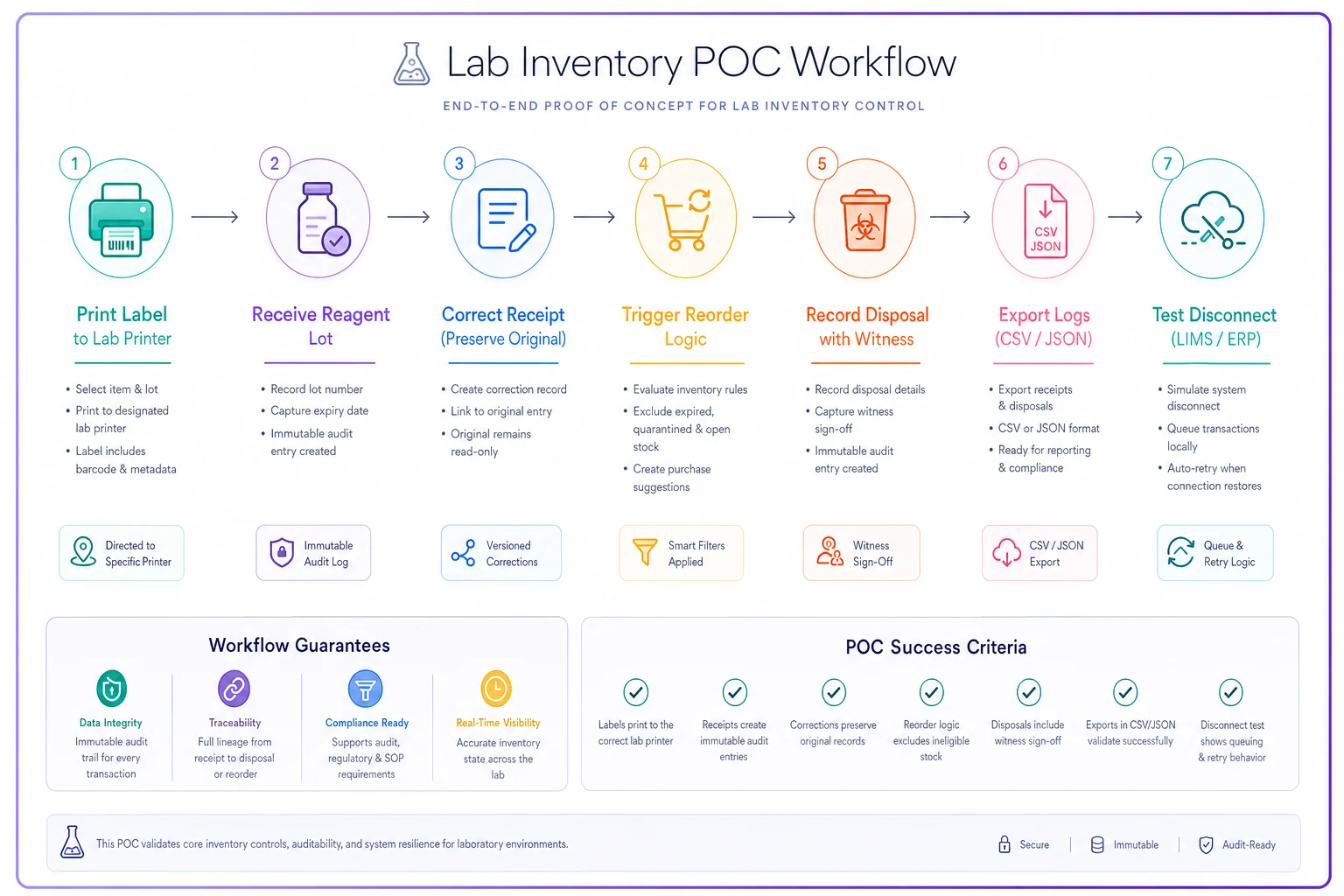
Steps 3 and 7 are the two most teams skip, and they're the two that predict audit pain. A vendor who can't demonstrate correction history or offline queuing on the spot is showing you a real limitation.
Red Flags to Watch For
Some warning signs show up in the sales process long before deployment:
-
"Integration" means a nightly CSV. If their LIMS/ERP connection is a scheduled file drop someone has to monitor, call it what it is — a manual process with extra steps.
-
No API docs before signing. If you can't review the API documentation during evaluation, assume it's thinner than claimed.
-
Audit logs that can be edited. Any system where a transaction record can be changed without preserving the original is a non-starter for receipts and disposals.
-
Reorder logic that counts total quantity. If it can't exclude expired, held, and open stock, it will either over- or under-order constantly.
-
"We support all major printers." Make them name your model and firmware. Vague printer claims are the single most common post-sale surprise.
-
Disposals logged as adjustments. If there's no distinct disposal record with reason and witness, your controlled-substance and hazardous-waste reporting will be a mess.
-
Per-feature API fees discovered late. Ask upfront what each connector or integration costs. "The API is included" sometimes means read-only; writes cost extra.
-
No data-exit plan. If getting your own data out requires a support ticket and a fee, you're renting a hostage situation.
If getting your own data out requires a support ticket and a fee, you're renting a hostage situation.
When This Level of Rigor Makes Sense — and When It Doesn't
A full RFP, scoring rubric, and POC is appropriate when you're in a regulated or audited environment, running multi-site inventory, handling controlled or hazardous materials, or spending enough that a bad choice is expensive to unwind. In those cases, the extra few weeks of evaluation are cheap insurance.
It's probably overkill for a single small lab tracking a few hundred SKUs with no controlled substances and no integration requirements. If that's you, pick two vendors, run the POC script against both, and skip the formal rubric. The script alone will surface most of the real differences.
Who should not do this at all: teams that haven't written down their constraints yet. If you don't know your printer models, your LIMS API's capabilities, and your audit-record requirements, you'll score vendors against a moving target and pick on vibes. Spend a day documenting constraints first — that single step changes the outcome more than any demo.
A Quick Real Scenario
A mid-size environmental testing lab — around 25 bench staff, roughly 900 active reagent and consumable SKUs — was running inventory in a spreadsheet plus a legacy module nobody trusted. Their recurring pain: stockouts on a handful of critical reagents a few times a quarter, and a disposal log that was really just a column of manual notes.
Their first shortlist was built on demo impressions. When they ran the POC script, the front-runner failed step 4 (reorder logic counted total stock including expired units) and step 3 (quantity corrections overwrote the original entry). The polished second-place vendor handled both cleanly but required new printers. They ended up going with a third option that supported their existing hardware and handled correction history properly — it scored slightly lower on dashboards but passed every must-have.
Post-deployment, critical-reagent stockouts dropped to near zero over the following two quarters. The part the quality team cared about most: disposal records went from freeform notes to structured, exportable entries that held up in their next audit without a scramble. The dashboards they'd obsessed over in demos barely came up after go-live.
That's the pattern worth internalizing. The features that win demos are rarely the features that determine whether the system actually works a year in. Build your evaluation around audit integrity, reorder correctness, and printer and integration fit. Make vendors prove each one against your own data and hardware, and let the rubric — not the sales pitch — make the call.
Ready to upgrade your lab operations?
Join 500+ labs using Labioly to save time, reduce errors, and enhance productivity and compliance.