

Every LIMS migration starts the same way. Management picks a new system, IT schedules the cutover, and someone realizes there are 8 million sample records spread across 47 different data structures that somehow need to move perfectly — or the entire lab fails its next audit.
The typical approach? Export everything, write some transformation scripts, hope nothing breaks, and spend the next six months cleaning up mismatches. Labs lose months of productivity on migrations that could have gone smoothly with a better playbook.
The problem isn't the technology. Modern LIMS platforms handle data imports fine. The real problem is that labs try to migrate everything at once without understanding what actually needs to move, how fields map between systems, and what validation matters for their specific workflows.
Why labs struggle with the pilot-first approach
Most LIMS vendors push for the "big bang" migration. They want all your data moved in one weekend so they can mark the project complete. But lab data is messier than anyone admits during sales demos.
You've got sample IDs that changed formats three times since 2018. Test results stored in free-text fields because someone disabled validation years ago. Instruments writing timestamps in local time, UTC, and sometimes just the date depending on which technician ran the calibration.
A pilot-first migration flips this around. Instead of moving everything and fixing problems later, you move a minimal viable dataset first — usually somewhere around 500–1,000 records that represent your actual operational complexity. Not the clean demo data. The real stuff with all its inconsistencies.
That smaller dataset surfaces field-mapping disasters before they multiply across millions of records. That custom field for "alternative sample designation" that seemed unimportant? Turns out it contains the cross-reference IDs for your biggest pharmaceutical client's chain of custody requirements.
Building your minimal viable dataset
The dataset selection makes or breaks your pilot. Pick records that are too clean and you'll miss critical issues. Pick records that are too edge-case and you'll waste time on problems that affect a fraction of a percent of your data.
Eliminate lab bottlenecks and errors.
Labioly helps you monitor, manage, and report lab activities efficiently and compliantly.
- Real-time sample tracking
- Inventory and supply alerts
- Staff workflow coordination
No credit card required
Include records from each major workflow:
-
Standard clinical samples (30% of dataset)
-
Research/experimental protocols (20%)
-
External client submissions (20%)
-
Instrument-generated results (20%)
-
Manual entry/corrections (10%)
Time period selection matters: Pull records from at least three distinct periods:
-
Current quarter (active workflows)
-
One year ago (typical historical data)
-
Three to five years ago (legacy format changes)
Don't cherry-pick clean data. Specifically include:
-
Records with missing fields
-
Samples with multiple test iterations
-
Cancelled or amended results
-
Records touched by multiple technicians
-
Any data that triggered audit findings
When selecting pilot records, include workflows that commonly trigger audit findings in your lab to surface compliance risks early.
One clinical lab thought their 10-year dataset would be straightforward to migrate. Their pilot revealed 14 different date formats across the records — a side effect of changing LIMS twice before and carrying old formats forward each time. Fixing that on 1,000 records took two days. Finding it during a live cutover on 10 million records would have been catastrophic.
Canonical field-mapping that survives audit scrutiny
Field mapping sounds simple until you realize "SampleID" in your old system might map to "PrimaryIdentifier," "SpecimenCode," and "AccessionNumber" in the new system depending on the sample type.
The canonical mapping template isn't just a spreadsheet showing old field → new field. It needs to capture the business logic that determines which mapping applies when.
Essential mapping documentation:
| Source Field | Target Field(s) | Transformation Logic | Validation Rule | Audit Requirement |
|---|---|---|---|---|
| SAMPLE_ID | Primary_Identifier | Direct copy if prefix = "CLN" | Must be unique, non-null | 21 CFR Part 11 |
| SAMPLE_ID | ResearchSpecimenID | Direct copy if prefix = "RES" | Alphanumeric, 12 chars | Internal SOP-4.2 |
| TEST_DATE | Analysis_DateTime | Parse MM/DD/YYYY → ISO 8601 | Must be ≤ current date | CAP checklist GEN.43850 |
| RESULT_VAL | Numeric_Result | Convert string to float | If non-numeric, map to Text_Result | CLIA 493.1291 |
Notice how each mapping includes the compliance requirement driving it. When auditors ask why you transformed data a certain way, you need that documented trail — not a verbal explanation from whoever ran the migration script.
The transformation logic column prevents the most expensive migration failures. A pharmaceutical testing lab mapped all their pH values directly until they discovered their old system stored them as strings ("7.4 (retest)") while the new system expected pure numerics. That kind of mismatch breaks automated reporting, fails QC verification tests, and triggers validation failures during regulatory inspections.
Staged reconciliation tests that catch issues early
Reconciliation isn't just counting records before and after migration. It's verifying that data maintains its scientific and regulatory integrity through the transformation.
Stage your reconciliation tests across three checkpoints:
Checkpoint 1: Record count reconciliation Before getting fancy, verify the basics:
-
Total records exported = Total records imported
-
Records per category match (samples, tests, results, amendments)
-
No duplicate primary keys created during transformation
Checkpoint 2: Field-level validation For each mapped field, validate:
-
Data type consistency (numeric stays numeric)
-
Required fields remain populated
-
Calculated fields compute correctly
-
Relationships between records preserved
Checkpoint 3: Business logic verification This is where most migrations fall apart. Test that:
-
Chain of custody sequences remain intact
-
Test result amendments link to original results
-
Sample relationships (replicates, dilutions) maintain hierarchy
-
Instrument data associations preserve traceability
One genomics lab ran these reconciliation tests on their pilot data and found their migration script was silently dropping amendment records when a sample had more than three test iterations. In the pilot of 1,000 samples, this affected 23 records. Across their full database, it would have wiped over 8,000 amendment records and failed their next FDA inspection.
Here's a simple depiction of the migration workflow.
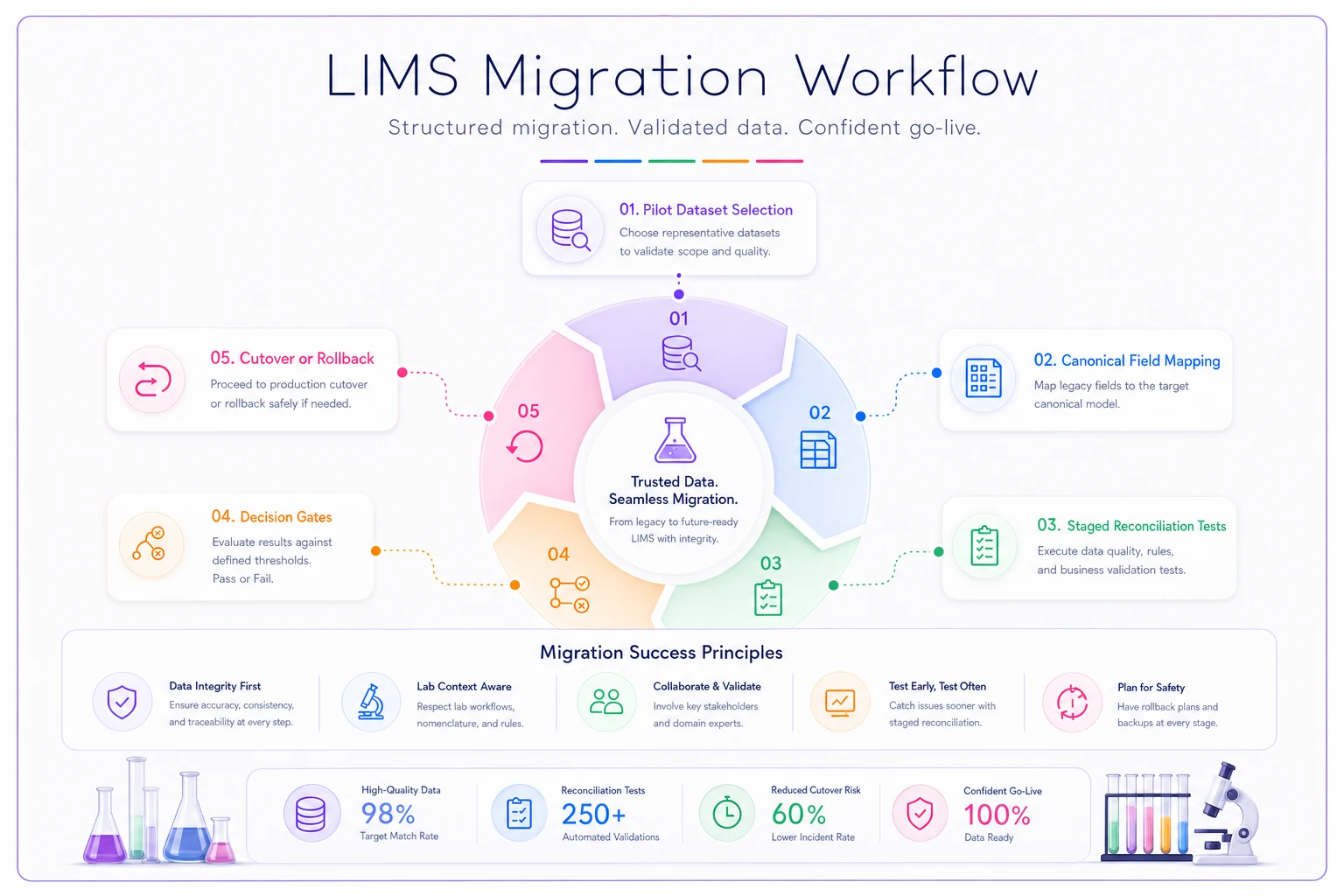
The diagram emphasizes the sequential flow from pilot selection through decision gates to help teams coordinate checks and approvals.
Decision gates that prevent migration disasters
The cutover/rollback decision isn't binary. You need multiple decision gates with clear criteria for proceeding or stopping.
Gate 1: Pilot validation (Day -30)
-
100% of pilot records migrate successfully
-
All reconciliation tests pass
-
Field mappings verified by subject matter experts
-
No critical data loss identified
If any criteria fail, stop and fix before proceeding.
Gate 2: Parallel run validation (Day -14)
-
New system processes current samples correctly
-
Reports match between systems
-
User acceptance testing complete
This is your last real chance to catch workflow issues before they hit operations.
Gate 3: Cutover readiness (Day -1)
-
Full backup of source system completed
-
Rollback scripts tested and verified
-
All users trained on critical workflows
-
Communication plan activated
Gate 4: Post-cutover verification (Day +1)
-
Spot-check roughly 10% of migrated records
-
Verify critical reports generate correctly
-
Confirm instrument data flows properly
-
Monitor error logs for unexpected issues
Each gate needs a designated decision maker with actual authority to stop the migration — the lab director or quality manager, not the IT project lead or the vendor trying to hit their go-live deadline.
The rollback plan nobody wants to use
Every migration needs a rollback plan, but most labs create one that's impossible to execute under pressure. "Restore from backup" sounds simple until you realize staff have been entering new samples for six hours and you can't lose that data.
A functional rollback plan has three components:
Immediate rollback (0–4 hours post-cutover):
-
Keep source system in read-only mode
-
Maintain ability to flip back quickly
-
No data destruction in source system
Short-term rollback (4–48 hours):
-
Export any new data from target system
-
Restore source system to operational state
-
Re-import new data to source system
-
Document all affected samples for audit trail
Long-term recovery (48+ hours):
-
Run parallel systems temporarily
-
Fix critical issues in production
-
Manual data reconciliation where needed
-
Document all corrections for compliance
A molecular diagnostics lab caught a serious problem when their new LIMS started calculating viral loads incorrectly — a decimal place error buried in the field mapping. They found it four hours post-cutover during routine QC checks. Because they'd kept their source system accessible and hadn't destroyed anything, they rolled back, fixed the mapping, and re-migrated the following weekend with minimal disruption. Clean outcome, but it required having the rollback plan actually ready to execute, not just written down somewhere.
Real-world migration timeline
A reference laboratory with 4 million sample records and 12 instrument integrations successfully migrated using this playbook:
Week 1–2: Pilot dataset preparation
-
Identified ~1,200 representative records
-
Documented all data anomalies found
-
Created initial field mappings
Week 3–4: Pilot migration and testing
-
Migrated pilot dataset three times
-
Refined mappings after each iteration
-
Fixed 47 field-mapping issues
Week 5–6: Expanded testing
-
Increased dataset to 10,000 records
-
Ran full reconciliation suite
-
Identified four business logic gaps
Week 7–8: Parallel run
-
Processed live samples in both systems
-
Compared results and reports
-
Trained power users
Week 9: Cutover
-
Friday night
Final data export
-
Saturday
Full migration run
-
Sunday
Validation and verification
-
Monday
Go-live with close monitoring
Week 10–12: Stabilization
-
Daily reconciliation reports
-
Issue tracking and resolution
-
Performance optimization
Total elapsed time: 12 weeks. Their previous migration attempt — straight to full cutover — took six months to recover from.
Building this into operational software
Managing a LIMS migration through spreadsheets and email chains adds unnecessary risk to an already complicated process. AI-powered operational platforms can codify your migration playbook into repeatable, trackable workflows.
The right platform tracks each record through its transformation journey, automatically flags mapping anomalies, and maintains the audit trail regulators expect. Canonical field mappings stop being static documentation and become active validation rules instead. Reconciliation tests run automatically rather than relying on manual spot-checks that someone may or may not remember to run at 2am on a Saturday cutover.
This kind of systematic approach changes LIMS migrations from high-risk IT projects into controlled operational transitions. You still need domain expertise to define the mappings and validation rules — that part doesn't get automated away — but the platform handles the execution complexity that typically causes migrations to go sideways.
The difference between migration success and chaos
LIMS migrations fail when labs trust vendor timelines over operational reality. Your data has years of accumulated complexity that no vendor script will handle perfectly on the first pass.
Labs that succeed treat migrations as operational projects, not IT installations. They involve the people who actually use the data daily. They test with real messy data, not cleaned demo sets. They have clear decision gates and aren't afraid to stop when something doesn't reconcile.
And they document everything — not for the sake of documentation, but because when an auditor asks why a specific field transformed a certain way, you need that answer immediately. The migration playbook isn't just about moving data successfully. It's about maintaining the integrity and compliance that keeps your lab operational.
Ready to upgrade your lab operations?
Join 500+ labs using Labioly to save time, reduce errors, and enhance productivity and compliance.