

Most labs treat audit evidence like an afterthought until an inspector shows up. Then it becomes three weeks of panicked document hunting across shared drives, LIMS exports, instrument logs, and someone's personal folder labeled "ImportantStuff2024FINALv3."
Why labs end up with evidence scattered everywhere
Modern labs operate like this: your mass spec generates raw files in vendor format. Your LIMS stores sample metadata in its database. Photos from contamination investigations sit in someone's phone. Temperature logs export as CSV. Calibration certificates arrive as PDFs. Training records live in HR software. And when an auditor asks "show me all evidence for batch XYZ-2024-089," you're manually assembling pieces from everywhere.
The worst part happens when you realize halfway through an audit that your evidence doesn't actually prove what you think it proves. That photo of the contaminated plate? No timestamp. The instrument log showing calibration? Different timezone than your LIMS. The deviation report? References a sample ID that got renamed during a database migration.
The fundamental schema problem nobody talks about
What drives lab managers crazy: every system speaks a different language about the same events. Your LIMS calls it "SampleID." Your instrument calls it "SpecimenNumber." Your ELN uses "ExperimentRefSample." The photo management system just has "IMG_2847.jpg" with metadata buried in EXIF tags that nobody reads.
Eliminate lab bottlenecks and errors.
Labioly helps you monitor, manage, and report lab activities efficiently and compliantly.
- Real-time sample tracking
- Inventory and supply alerts
- Staff workflow coordination
No credit card required
A canonical evidence schema isn't about forcing everything into one database. That never works. It's about creating a translation layer that understands how different systems describe the same reality. When an auditor asks about a specific sample, your evidence architecture should instantly know that Sample_ID "ABC123" in LIMS corresponds to the following:
-
Specimen_Number "2024-ABC-123" in the mass spec
-
Experiment "EXP-789" in the ELN
-
Images "IMG2847" through "IMG2852" from the contamination investigation
-
Temperature log entries between timestamps X and Y
-
Training records for operators who touched that sample
The schema becomes your rosetta stone for evidence correlation. Without it, every audit is a manual translation exercise across systems that were never designed to talk to each other.
Building adapters that actually capture what matters
Most labs approach instrument integration backwards. They try to capture everything, then figure out what's important later. That's how you end up with 10TB of raw data that nobody can search and evidence gaps for the stuff that actually matters.
Event-triggered capture: When specific events happen — calibration complete, QC fail, deviation logged — the adapter pulls full context automatically. Not just the event record, but instrument state, operator ID, environmental conditions, and any related files. Package it all with consistent metadata immediately, not during the audit scramble.
Scheduled evidence sweeps: Every four hours or so, adapters check for orphaned evidence — photos without sample IDs, instrument logs without corresponding LIMS entries, manual observations not linked to batches. These orphans are where audit findings hide.
Change-detection patterns: Your adapters should know when evidence changes unexpectedly. If someone modifies a critical file, overwrites calibration data, or deletes images, you need audit trails showing what changed and when. This isn't paranoia; it's protection against the "I don't know what happened to that file" conversation during inspections.
Here's what a real adapter implementation looks like:
-
Mass Spec Adapter
Monitors: \\INSTRUMENT01\Data\*.raw
-
Triggers
On file creation
-
Extracts
Sample ID from filename, method parameters from header
-
Enriches
Links to LIMS batch, pulls operator from schedule
-
Indexes
Timestamp (normalized UTC), instrument ID, batch reference
-
Stores
Original file + extracted metadata in evidence store
-
Alerts
If no matching LIMS entry within 30 minutes
The adapter doesn't just move files around. It understands context and builds the evidence chain automatically.
Photo evidence: the nightmare everyone ignores until audit time
Lab photos are where evidence architecture completely falls apart. Someone takes a photo of contamination. They email it to their manager. The manager saves it to a shared drive. Six months later, nobody remembers which batch it belonged to, who took it, or even which instrument had the problem.
Photos need special handling because they're usually created outside your controlled systems. Someone uses their phone because it's faster than logging into the photo station computer. They text it to a colleague for a second opinion. By the time it reaches your "official" documentation, the chain of custody is already broken.
A canonical photo ingestion pattern tags every image immediately with the device ID, the original timestamp from the device rather than the upload time, GPS coordinates for multi-room facilities, and a quick context prompt asking for batch number or instrument. Then your evidence system takes over — matching that timestamp to active batches, identifying the likely instrument based on location, linking to open deviations or investigations, and flagging anything that has no supporting documentation.
The key is making evidence capture easier than not capturing it. If someone has to fill out three forms to upload a photo, they won't do it. If they can snap, tag, and forget, you'll actually get the evidence.
Retention rules that match operational reality, not just compliance minimums
Every lab has retention policies. Few labs have retention rules that actually work operationally. The policy says "keep for 7 years." But keep what exactly? Raw instrument files? Processed data? The specific version of software that can read those files? The calibration records from that day? The training records for the operator?
Real retention architecture thinks in evidence packages, not individual files. When you process batch ABC-123, you're not just creating data points. You're creating an evidence story that includes raw instrument outputs, LIMS records and audit trails, relevant SOPs with version control, operator qualifications active that day, environmental monitoring for that shift, any deviations or investigations triggered, photos or observations documented, and QC reports and verification records.
Your retention rules need to understand these relationships. Deleting an "old" calibration certificate might break the evidence chain for 50 batches processed under that calibration. Your architecture should prevent this, not just log it after the fact.
Here's a retention pattern that actually works:
-
Core package
Full retention period (7 years)
-
Supporting evidence
Linked to core, cannot delete independently
-
Working files
90 days unless linked to investigation
-
Superseded versions
Retain if referenced by any batch
-
Orphaned evidence
Flag for review after 30 days
The system knows that deleting one piece might invalidate the entire evidence package. That's the logic most labs are missing.
Search patterns that find evidence before the auditor does
The difference between a smooth audit and a nightmare isn't how much documentation you have. It's how fast you can find exactly what the auditor wants to see. Most labs can't answer "show me all evidence for batches processed by Operator X during the March temperature excursion" without a week of manual searching.
Semantic search handles the terminology problem — understanding that "contamination," "microbial growth," and "failed sterility" might all refer to the same investigation. Your search system should know these relationships without requiring exact keyword matches.
Temporal correlation handles the time problem. When someone searches for "calibration issues in Q2," the system should pull calibration records between April and June, all batches processed under those calibrations, any investigations triggered by those batches, and related findings even if the investigation wasn't formally opened until Q3.
Evidence completeness scoring is what separates proactive labs from reactive ones. For any search result, show what percentage of expected evidence exists. If a batch should have 12 evidence types but only 9 exist, flag it before the auditor finds the gap.
Search isn't just about finding files. It's about understanding evidence relationships and surfacing problems before someone else does.
Implementing adapters: where labs get stuck
The biggest mistake labs make with evidence adapters is trying to build everything custom. You don't need to reinvent file monitoring, parsing, or metadata extraction. Focus on the business logic that understands your specific evidence requirements.
Start with one high-pain instrument — usually something that generates lots of files in proprietary formats. Build an adapter that works through this sequence:
-
Monitors the instrument's output directory
-
Parses enough metadata to identify the sample or batch
-
Links to your LIMS or ELN records
-
Copies files to canonical storage with proper naming
-
Generates an evidence manifest entry
-
Alerts on any anomalies
Don't try to parse every field from proprietary formats. Extract what you need for evidence correlation, preserve the original file, and move on. Timestamp integrity matters more than parsing every parameter — a perfectly extracted dataset with mismatched timestamps will fail an audit faster than incomplete metadata.
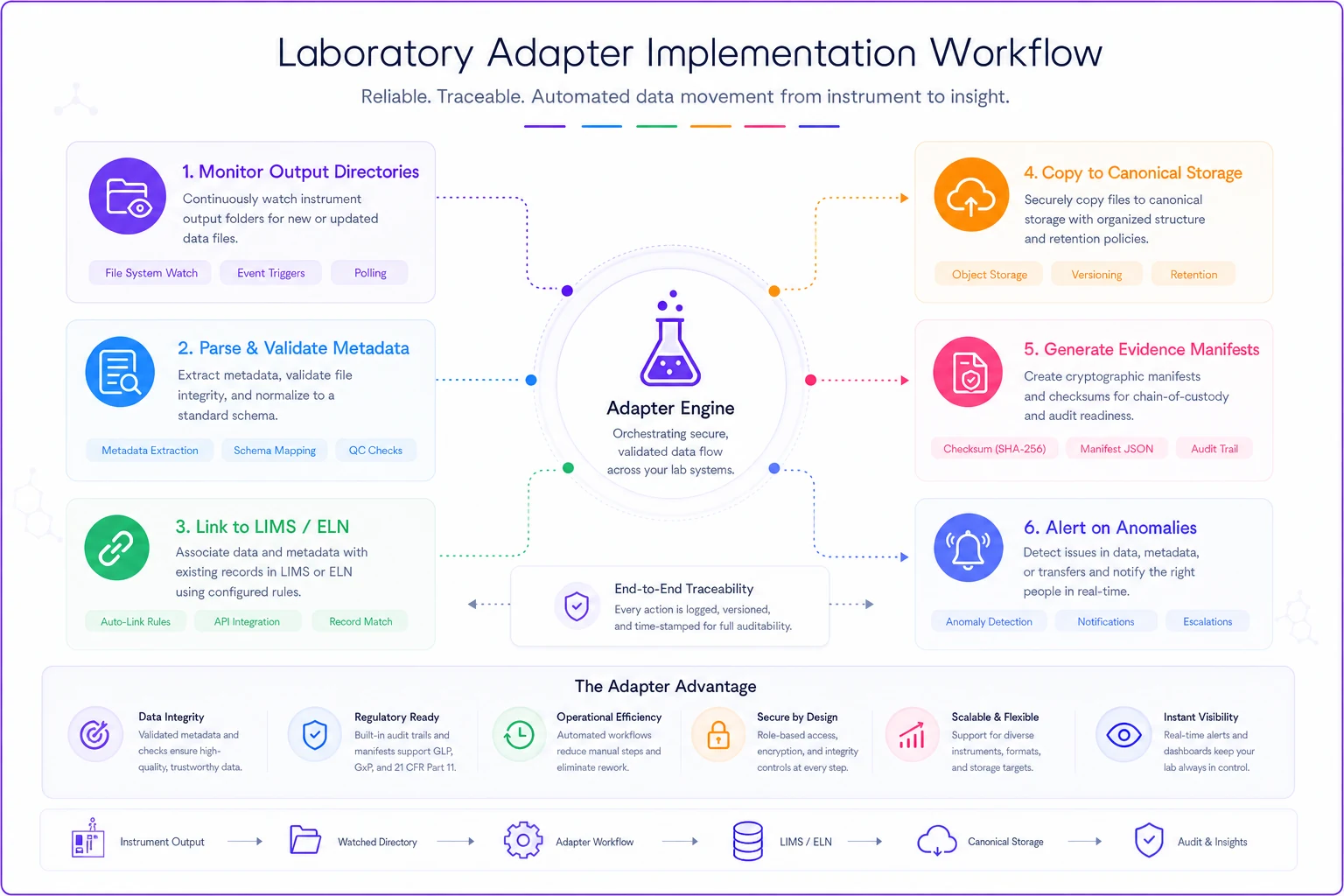
This flow shows the minimal steps that make an adapter useful rather than just noisy.
Start with one adapter and instrument that blocks audits today rather than trying to catalogue every field from every vendor format.
Once one adapter works, the pattern becomes clear. Each new instrument follows the same basic flow with different parsing logic. Within three or four adapters, you'll have covered the majority of your critical evidence sources.
The mobile evidence problem nobody wants to admit
Your best technician notices something weird during a run. They snap a photo with their phone for reference. Two weeks later, that photo becomes critical evidence in a deviation investigation. But it's on their personal device, mixed in with hundreds of other photos, and they can't remember the exact date.
Labs pretend this doesn't happen, but it happens constantly. People use personal devices because they're convenient. Fighting that behavior doesn't work. Building architecture that accommodates it does.
A practical mobile evidence pattern works like this:
-
Provide a simple mobile app or web portal with minimal friction
-
Let people upload photos immediately and auto-extract timestamp and location from image metadata
-
Prompt for just enough context — a batch number or instrument ID
-
Queue for proper classification later
-
Create an audit trail showing when uploaded versus when the photo was originally taken
The goal isn't perfect documentation at capture time. It's getting evidence into your system before it disappears into someone's camera roll forever.
Evidence packages for common audit scenarios
Certain evidence requests show up repeatedly across audits. Smart labs pre-build evidence packages for these scenarios instead of scrambling when the auditor walks in.
| Audit Scenario | Key Evidence Components |
|---|---|
| Contamination Investigation | Environmental monitoring, affected batches, personnel records, cleaning logs, photos, root cause docs, corrective action evidence |
| Instrument Qualification | IQ/OQ/PQ protocols, calibration certificates, maintenance records, change control, operator training, QC performance data |
| Batch Release | Raw instrument data, LIMS batch record, environmental conditions, operator qualifications, QC results, deviation history, release signatures |
Contamination Investigation Package pulls environmental monitoring data for the week before and after, all batches potentially affected, personnel training and gowning records, cleaning and sanitization logs, photos of the contamination, root cause investigation documents, preventive action evidence, and follow-up monitoring showing resolution.
Instrument Qualification Package covers IQ/OQ/PQ protocols and reports, calibration certificates current and previous, maintenance records, change control documentation, operator training specific to that instrument, recent QC performance data, and any deviation history.
Batch Release Package includes all raw data from instruments used, the LIMS batch record with audit trail, environmental conditions during processing, operator qualifications active on the processing date, QC results and acceptance criteria, any deviations and investigations, and release approval signatures with timestamps.
When an auditor asks about any of these scenarios, you're pulling one pre-validated package, not assembling evidence from scratch under pressure.
Making retention actually manageable
The dirty secret about lab data retention: most labs keep everything forever because they're terrified of deleting something important. This leads to petabytes of unsearchable data and, ironically, makes finding actual evidence harder.
Intelligent retention requires understanding evidence dependencies. Your system needs to know what evidence is primary versus secondary, how evidence pieces reference each other, when retention periods actually start (hint: not always the creation date), and what can be archived versus what needs rapid retrieval.
A retention decision tree that actually works looks like this:
-
Is it referenced by any batch still in retention? Keep it.
-
Is it part of an open investigation? Keep it.
-
Is it linked to a failed audit finding? Keep it for 10 years.
-
Is it a training record for active personnel? Keep it.
-
Is it a superseded SOP referenced by retained batches? Keep it.
-
Is it instrument data with no LIMS connection? Flag for review.
-
Has retention period expired with no dependencies? Archive it.
-
Archived for two or more years with no access? Delete with audit trail.
The system makes retention decisions based on relationships, not just dates. That distinction matters more than most labs realize.
The evidence architecture labs actually need
Stop thinking about evidence as files to store. Start thinking about it as proof of what actually happened in your lab. Every retained piece should answer a question an auditor might ask.
A working evidence architecture has six core components:
-
Canonical Schema
Defines how different systems describe the same events
-
Adapter Layer
Translates and enriches evidence from each source
-
Evidence Store
Immutable repository with full audit trails
-
Correlation Engine
Links related evidence automatically
-
Search Interface
Finds evidence by concept, not just keywords
-
Retention Manager
Maintains evidence packages, not just files
This isn't about buying another system. It's about building the connective tissue between systems you already have. Your LIMS stays your system of record. Your instruments keep generating their native formats. But now there's a layer that understands how it all fits together and can surface any piece of it on demand.
Real implementation: start small, prove value, then scale
Pick your messiest evidence problem. The typical candidates are photo documentation with no traceability, instrument data locked in proprietary formats, evidence scattered across personal folders, and no real connection between deviations and supporting data. Pick one and fix it before expanding.
Build one adapter that solves that specific problem. Get it working for one instrument or one workflow. Show how it prevents the "where's that file?" conversation during audits. Then expand from there.
| Phase | Timeline | Focus |
|---|---|---|
| Schema definition | Weeks 1–2 | Define canonical schema for critical evidence types |
| First adapter | Weeks 3–4 | Build adapter for highest-volume instrument |
| Testing | Weeks 5–6 | Validate against historical data, refine correlation rules |
| Production deployment | Weeks 7–8 | Deploy for new data only |
| Expansion | Weeks 9–12 | Add two or three more adapters, refine search |
| Broad coverage | Months 4–6 | Extend to majority of evidence sources |
| Ongoing refinement | Month 7+ | Continuous improvement based on audit findings |
You don't need perfect coverage immediately. Even connecting three or four critical evidence sources transforms audit readiness in a way that's immediately visible during inspections.
Why manual evidence assembly breaks at scale
When your lab processes 20 batches a month, manual evidence gathering seems manageable. Someone spends a day before each audit pulling files together. Painful but doable.
At 200 batches monthly, manual assembly becomes a full-time job. At 2,000, it's not realistic at all. You can't retroactively build evidence chains for that volume — the evidence needs to self-assemble as operations happen.
This is where AI-powered operational software makes sense, not as a magic solution, but as the pattern-matching layer that connects evidence automatically. The system watches your operations, understands what evidence should exist for each workflow, and alerts when something's missing. The automation handles the tedious correlation work: matching timestamps, linking related records, identifying orphaned evidence. Your team focuses on investigating anomalies and improving processes rather than manually assembling evidence packages before every inspection.
Bottom line: architecture beats heroics
Every lab has that one person who somehow knows where everything is documented. They're the hero during audits, manually assembling evidence from memory and tribal knowledge. But what happens when they leave? Or when audit scope exceeds what one person can remember?
Evidence architecture isn't about replacing human judgment. It's about building systems that capture and connect evidence automatically so your experts can focus on science, not paperwork. When evidence self-organizes based on clear schemas and smart adapters, audits become demonstrations of operational excellence rather than archaeological expeditions through shared drives.
The labs that survive increasingly complex regulatory requirements aren't the ones with the most documentation. They're the ones with evidence architecture that proves what actually happened, when it happened, and that it happened according to procedure. Build that architecture now, before your next audit forces you to.
The labs that survive increasingly complex regulatory requirements aren't the ones with the most documentation. They're the ones with evidence architecture that proves what actually happened, when it happened, and that it happened according to procedure. Build that architecture now, before your next audit forces you to.
Ready to upgrade your lab operations?
Join 500+ labs using Labioly to save time, reduce errors, and enhance productivity and compliance.