

Most lab cybersecurity advice falls apart the moment you walk onto an actual bench floor. The guidance assumes you can patch everything, segment freely, and run modern endpoint protection on every device. Then you meet the HPLC controller running Windows 7 because the instrument software was validated against it in 2014 and the vendor won't support anything newer. Or the sequencer that needs a hard-coded IP and an open SMB share to dump its output. Or the mass spec PC that the vendor explicitly says you may not touch, under threat of voiding your service contract.
This is the reality gap. Lab cybersecurity and device hardening isn't about applying enterprise IT playbooks to lab gear — it's about building a security posture around instruments you can't fully control, without an army of IT staff and without breaking the validated state of your systems.
What follows is an operational approach: how to zone a network when you can't touch the instruments, how to harden what the vendor does let you harden, how to insert security without sitting in the data path, and how to capture evidence that holds up when something goes wrong. It's written for lab managers and research teams who own the risk but don't own a security operations center.
Why lab device security breaks differently than office IT
The core problem is that instruments aren't computers you manage — they're appliances with a computer bolted on, and that computer belongs to the vendor's validation story, not yours.
In a normal office environment, a workstation that falls three patches behind gets flagged, remediated, and moved on. In a lab, the "workstation" might be the only thing that can talk to a $400k instrument, and patching it could invalidate your IQ/OQ documentation or trigger a support refusal. So the device sits there, unpatched, for years. Multiply that across a facility and you get a network full of soft targets that nobody is technically allowed to fix.
-
The frozen OS. Instrument control PCs running end-of-life operating systems because the acquisition software was never ported forward. These machines can't take modern agents, and half the hardening tools crash them.
-
Flat networks by accident. Labs rarely design their networks — they grow them. Someone needed the new cytometer online, there was a free port, and now it's on the same broadcast domain as the finance printer.
-
Shared service accounts. The vendor engineer set up a local admin account during install, used the same password at every site, and that credential still works three years later.
-
Data egress nobody watches. Instruments dump files to network shares, cloud buckets, or USB sticks, and there's no record of what left, when, or whether it was tampered with.
None of these are the lab's fault, exactly. They're the predictable result of running vendor-constrained equipment inside an environment that was never architected for security. The fix isn't heroics — it's structure.
Network zoning when you can't trust the device
If you can only do one thing, do this: stop treating the network as a single space. Zoning is the highest-leverage control available to a lab because it works without touching the instrument at all. You're changing the environment around the device, not the device itself.
Eliminate lab bottlenecks and errors.
Labioly helps you monitor, manage, and report lab activities efficiently and compliantly.
- Real-time sample tracking
- Inventory and supply alerts
- Staff workflow coordination
No credit card required
The goal is to contain blast radius. If a frozen Windows 7 instrument PC gets compromised, you want that compromise trapped in a segment where it can't reach your LIMS database, your domain controller, or the other twelve instruments.
A practical zoning template that maps to how labs actually operate, rather than a textbook three-tier model:
| Zone | What lives here | Inbound rules | Outbound rules |
|---|---|---|---|
| Instrument control (quarantine) | Frozen-OS PCs, embedded controllers, anything unpatchable | Only from the data-broker zone, specific ports | None to internet; only to data-broker share |
| Data broker / adapter | File-collection servers, secure adapters, reconciliation jobs | From instrument + LIMS zones | To LIMS zone only, defined APIs |
| LIMS / ELN core | Databases, app servers, audit stores | From data-broker + user zones | Backup + update servers only |
| User / analysis | Staff workstations, analysis software | From user network | To LIMS + general internet (filtered) |
| Management | Switch mgmt, out-of-band, logging | From admin workstations only | To logging + update infra |
The important move here is the quarantine zone with no outbound internet access. Instruments almost never need to reach the open internet — they need to reach one share or one broker. When you default-deny everything else, an infected controller can't phone home, can't pull second-stage payloads, and can't laterally sweep your core systems.
Worth flagging: most labs over-segment the parts that are easy (user workstations) and under-segment the parts that matter (instrument controllers). The risk concentration is backwards from the effort. A VLAN per bench feels thorough, but if all those VLANs can reach the LIMS directly, you've built a maze with every door unlocked.
If full VLAN segmentation feels out of reach for a smaller facility, a cheaper version still works: a single isolated instrument subnet behind a simple firewall rule set, with one hardened broker machine as the only bridge to everything else. Not elegant, but it collapses dozens of attack paths into one controllable chokepoint.
Device-hardening checklists for instruments you're allowed to touch
Vendor constraints vary wildly. Some hand you a hardening guide. Some forbid changes entirely. Most sit in a gray zone where certain things are fine and others void support. The operational answer is to maintain a per-instrument hardening profile that records exactly what the vendor permits, so you're never guessing in the moment.
Before touching anything, confirm three things with the vendor in writing: which OS changes are allowed, whether antivirus or endpoint tools are supported (and which ones), and whether disabling specific services or ports affects the validated configuration. Get it in an email. "The engineer said it was fine" is not an audit artifact.
-
Remove or disable unused local accounts, especially the generic install account. If you can't remove it, rotate the password and store it in a managed vault.
-
Disable unneeded network services — SMBv1 is the classic offender and is almost never required by modern instrument software, though legacy acquisition tools sometimes still depend on it, so test first.
-
Lock down USB mass storage where the workflow allows, or at minimum log and restrict it. USB is the primary way malware walks onto air-gapped-ish instrument machines.
-
Apply application allow-listing instead of traditional antivirus when the OS is too old for modern agents. Allow-listing tolerates frozen systems far better and won't fight the acquisition software.
-
Disable auto-login and set a real screen lock on shared instrument stations — but weigh this against operational interruptions during long runs.
-
Turn off outbound internet at the network layer, not the device layer, so you don't depend on the instrument's own config holding.
-
Capture a known-good baseline image before and after hardening, so you can prove what state the machine was in and restore it quickly.
The mistake to avoid: hardening blind, then discovering a run failed overnight because you disabled a service the instrument quietly depended on. Every hardening change to a validated instrument should go through the same discipline as any configuration change — documented, tested on one unit first, verified with a real run, and reversible. If you've built a change-control habit for SOPs, extend it here rather than treating security tweaks as casual IT maintenance.
Secure-adapter patterns: security that sits beside the instrument, not inside it
This is the part that solves the "I can't touch the device" problem. Instead of hardening the instrument, you put a controlled layer between the instrument and everything else, and you do all your security work there.
A secure adapter is a small, well-managed machine or service that:
-
Collects output from the instrument share or export directory
-
Validates and fingerprints every file before it moves further
-
Forwards clean data into your LIMS/ELN through a defined, versioned interface
-
Logs everything with tamper-evident records
The value of this pattern is separation of concerns. The frozen instrument PC does exactly one thing — produce data to a local share. The adapter, which you fully control and can patch, modernize, and monitor, handles authentication, integrity checking, and transport. All the security responsibility moves to a surface you're actually allowed to manage.
A workable adapter workflow looks like this:
-
Instrument writes output to a local or isolated share (its normal behavior, unchanged).
-
The adapter polls that share on a schedule and pulls new files into a staging area.
-
Each file gets a checksum and is checked against expected naming, size, and format patterns.
-
Files that pass integrity and format checks are forwarded to the LIMS through the defined API; files that fail route to a quarantine folder with an alert.
-
The adapter writes a signed log entry recording source, timestamp, checksum, and outcome.
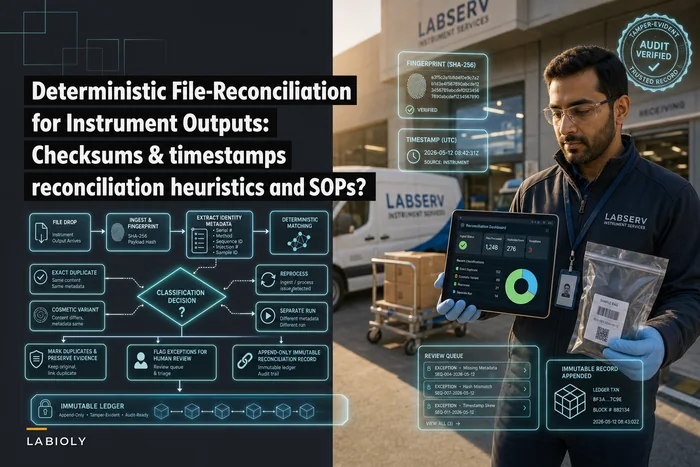
This is where adapter design and data-integrity design overlap heavily. The checksum-and-reconciliation logic that keeps instrument output trustworthy is the same machinery that catches tampering, and it's worth building both goals into the same layer rather than bolting security on later. If you're designing that reconciliation layer, the mechanics of deterministic file-reconciliation for instrument outputs carry directly into secure-adapter design — same checksums, same heuristics, extra security value.
The handoff from adapter to LIMS shouldn't be a free-for-all either. Define the contract — what fields, what format, what version — so a malformed or malicious payload can't just flow through. The discipline described in API governance for ELN/LIMS integrations is the same backbone that keeps your secure adapter from becoming an unguarded pipe.
When the adapter pattern is the wrong call
It's not universal. If your instrument already runs a supported modern OS and the vendor supports standard endpoint tooling, you may be adding a machine you don't need — just harden the device directly. Adapters also add a moving part that itself needs patching and monitoring. A lab with no one to own that machine will end up with a neglected adapter that becomes its own vulnerability. The pattern pays off when you have unpatchable instruments and someone who can keep the adapter current. If neither condition is true, zoning alone may be the more honest choice.
Here's a simple diagram of the adapter workflow to help teams align on responsibilities and data flows.
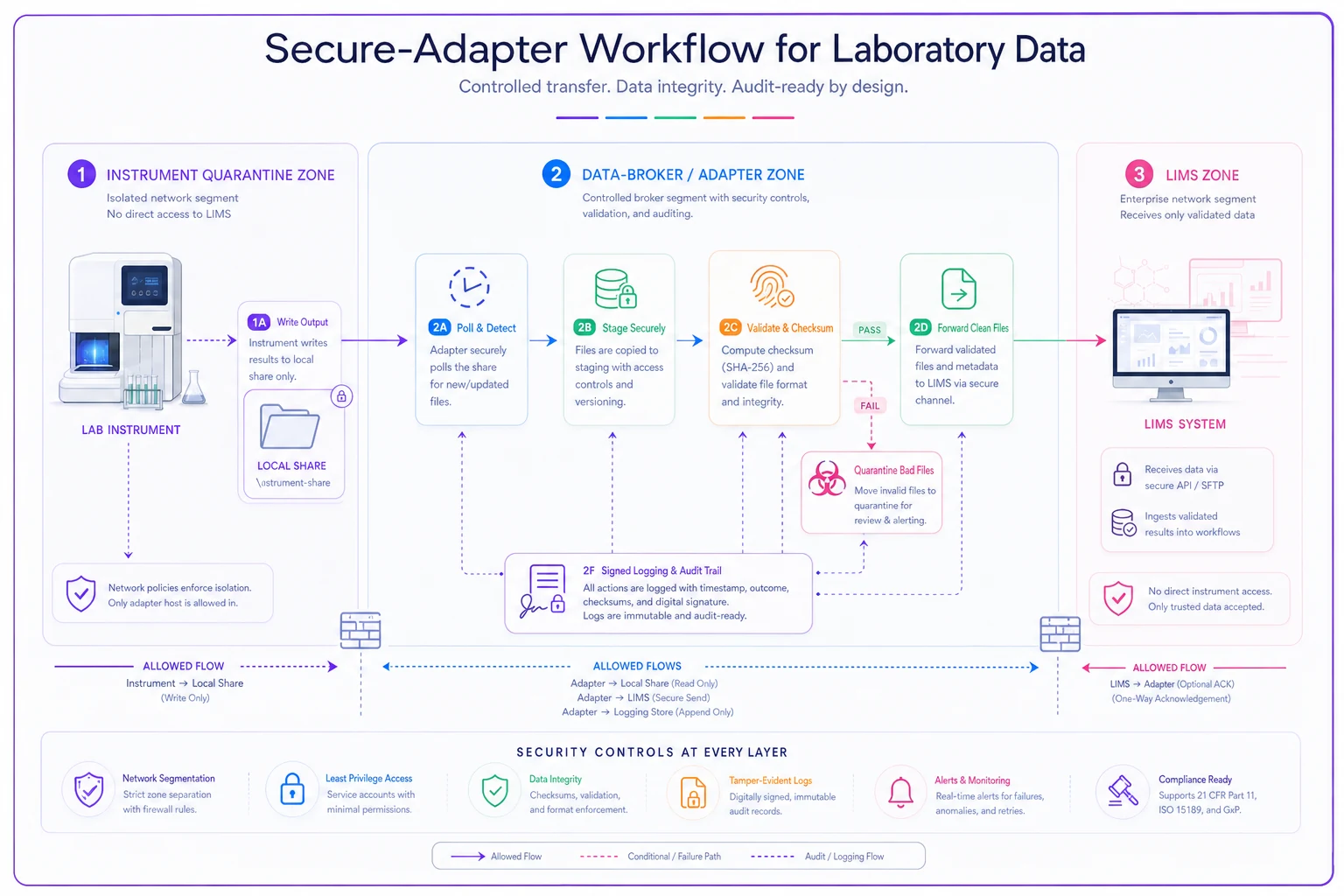
The visualization emphasizes the adapter as the controllable surface: patchable, monitored, and responsible for integrity, while the instrument remains unchanged.
Forensic-ready evidence capture within vendor constraints
The question that separates labs that recover well from labs that don't: when something goes wrong, can you reconstruct what happened?
Most labs can't. The instrument PC doesn't retain useful logs, the file share overwrites history, and nobody recorded the before-state. So when there's a data integrity question — did this file get altered, who accessed this machine, was that an attack or a glitch — the answer is a shrug.
-
Centralize logs off the device. Even if the instrument PC only emits basic Windows event logs, ship them to a logging host in your management zone. Logs on the device are deletable; logs shipped elsewhere are evidence.
-
Fingerprint data at the adapter. The checksum your adapter records at ingestion is your proof of what a file looked like at a known time. Tampering after that point becomes detectable.
-
Timestamp everything against a trusted clock. Forensic timelines fall apart when device clocks drift. Synchronized time is what lets you say "this happened before that."
-
Keep immutable baseline images. Before-and-after instrument images aren't just for recovery — they're the reference you compare against to prove what changed.
-
Record access, not just data. Who logged into the instrument station, when, and from where. On shared stations this is often the hardest gap and the most important one.
Think about retention this way: your evidence needs to outlive the incident's discovery window. Some data-integrity problems surface months later, during an audit or a reanalysis. If your logs rotate out after 30 days and your file share overwrites weekly, your forensic window is shorter than your risk window. Mapping evidence capture into a durable, queryable store — the same thinking behind a canonical audit-evidence architecture — is what turns scattered logs into something you can actually investigate.
A short real scenario
A mid-sized contract testing lab — around 30 staff, roughly 18 instruments — had grown its network the way most do: flat, with instrument PCs sharing broadcast space with everything else. Several control machines ran unsupported OS versions the vendors refused to update. There was no logging off the devices and no record of what instrument output had moved where.
The trigger was a near-miss. A chromatography PC started behaving oddly, and nobody could tell whether it was a hardware fault, a failing disk, or something worse. There was simply no evidence to investigate with. That ambiguity — not an actual breach — is what pushed the project forward.
The work spanned a few months and was deliberately unglamorous. They carved out an isolated instrument subnet and killed outbound internet from it. They stood up two adapter machines to broker file collection from the instrument shares into the LIMS, with checksums recorded at ingestion. They shipped instrument event logs to a central host. They imaged each instrument PC before and after any change.
The outcomes were modest but real. The number of devices with unrestricted network reach dropped from effectively all of them to a handful behind controlled rules. Investigation time for the next data-integrity question went from "we can't tell" to under a day, because the adapter logs and checksums gave a concrete timeline. And — the part the lab manager cared about most — none of it touched the validated instrument software, so no revalidation was triggered. The security improvement rode entirely on the environment around the instruments.
Where to start if you own this risk
The sequence matters more than the completeness. You don't need to do everything at once, and trying to will stall the project.
-
Zone first. Isolate instruments and cut their outbound internet. This is the biggest risk reduction for the least instrument interference.
-
Insert adapters for your file-producing instruments so you control the data path on a machine you can actually manage.
-
Capture evidence off-device — logs, checksums, baseline images — so your next incident is investigable.
-
Harden what the vendor allows, documented and tested, one instrument at a time.
-
Write it down. Per-instrument profiles of what's permitted, what's been changed, and what the baseline is.
The recurring mistake is treating device security as an all-or-nothing IT project that requires full control over every machine. That framing guarantees paralysis, because you'll never have full control over vendor-locked instruments. The labs that actually improve their posture accept the constraint and build around it — containing instruments they can't fix, brokering their data through layers they can, and leaving a trail durable enough to investigate.
None of this requires a large IT team. It requires treating your instruments as untrusted appliances, your network as the real control surface, and your evidence as something that has to survive the device that created it. That shift in framing does more for lab cybersecurity and device hardening than any single tool you could buy.
Ready to upgrade your lab operations?
Join 500+ labs using Labioly to save time, reduce errors, and enhance productivity and compliance.